
Author name: Vikash Parihar

Vikash Parihar is Dynamic Methods' Business Development Manager, leveraging 10 years of industry experience. His forward-thinking strategies and effective networking contribute significantly to our business growth and expansion.

vikash parihar
Mobile App Development for Beginners Guide

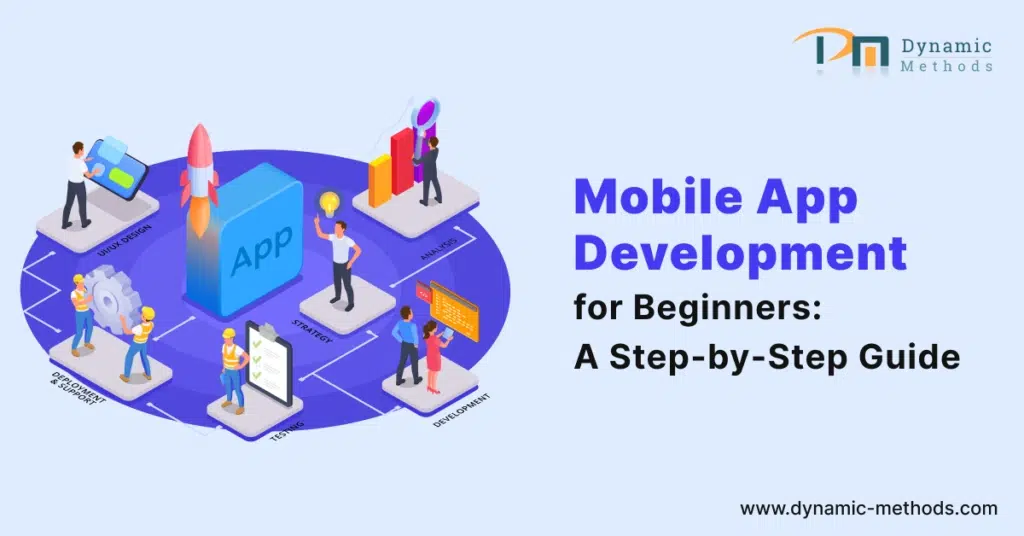
Mobile App Development for Beginners: A Step-by-Step Guide

Mobile App Development for Beginners Guide

With the advancement in technology, developing mobile apps has become increasingly accessible to people from various fields. From entrepreneurs to college students, anyone with an idea or interest in app development can now create their application. This mobile app development for beginners is designed to provide a detailed step-by-step process for developing mobile apps, starting from ideation to launching. The guide will cover all aspects of app development, including choosing the right platform, designing the user interface, programming the app, testing, and launching it on the app stores. Whether you have a revolutionary idea or wish to explore app development as a hobby, this guide will help you achieve your goal and create a successful mobile app.

Introduction

In this era of technology, mobile apps are our go-to for almost everything. From posting on social media to organizing our daily tasks, there’s an app for everything. Knowing the basics of mobile app development can be a game-changer and can help us come up with creative and unique ideas. So, get ready to explore a world full of possibilities with the knowledge of mobile app development.

Understanding the basics of Mobile App Development

What is Mobile App Development?

A mobile app is a software application that is specifically designed to operate on mobile devices such as smartphones and tablets. These apps offer a wide range of functionalities and features, such as gaming, productivity tools, social networking platforms, and e-commerce services.

Importance of Mobile Apps

Mobile apps provide users with a high level of convenience, allowing them to perform tasks and access information quickly and easily. They offer an efficient alternative to traditional desktop applications, enabling users to complete tasks on the go. Additionally, mobile apps provide users with a source of entertainment and a way to connect with others, making them an indispensable tool for many people worldwide.

For businesses, mobile apps can be a powerful tool for engaging customers and increasing brand visibility. They provide a direct way for businesses to communicate with customers, offer personalized experiences, and create additional revenue streams. By leveraging the power of mobile apps, businesses can stay ahead of the competition and build strong relationships with their customers.

Steps of Mobile App Development Process

mobile app development process

Idea Generation

If you’re planning to create a mobile app, For example, if you’re developing a social media app, your first step is to brainstorm ideas. It’s essential to consider your target audience’s needs, desires, and pain points while looking for gaps in the market or areas where existing apps could be improved. This way, you can come up with an idea that meets the needs of your users and stands out in the market.

Market Research

Once you have a solid app idea, it’s crucial to conduct market research to validate its potential. Analyzing competitors, identifying trends, and gathering insights can help refine your concept and differentiate your app from others in the market. Market research can also help you understand your users’ preferences and expectations, which can help you tailor your app to their needs.

Wireframing and Prototyping

Before diving into development, creating wireframes and prototypes is essential to visualize the user interface and user experience of your app. Doing so can help you identify any usability issues early on and allow for iterative design improvements. Wireframes and prototypes can also help you communicate your vision to your team and stakeholders.

UX Design

A mobile app’s success is largely determined by its design. Your design should focus on creating an intuitive and visually appealing interface that aligns with your brand identity. Pay attention to factors such as color schemes, typography, and iconography to create a design that resonates with your users.

App Development

Once the design is finalized, you can move on to app development. Choosing the appropriate programming languages and mobile app development frameworks based on your app’s requirements and target platforms is crucial. This ensures that your app is efficient, scalable, and easy to maintain.

Testing

Thorough testing is essential to ensure that your app functions correctly and delivers a seamless user experience. Conduct both manual and automated testing to identify and fix any bugs or performance issues. Testing can help you deliver a high-quality app that meets your users’ expectations.

Deployment

After testing, it’s time to prepare your app for deployment to the app stores. Following the guidelines and requirements of platforms such as the Apple App Store and Google Play Store is crucial to publishing your app successfully. This way, your app can reach your target audience and achieve maximum impact.

iOS vs. Android and Cross-Platform Development

Image comparing Android and iOS platforms with icons and feature highlights.

iOS App Development

iOS apps are created using Apple’s programming languages, Swift or Objective-C. Xcode is the official tool for creating iOS apps. When it comes to distributing apps, iOS apps are distributed via the Apple App Store. iOS apps are mainly designed for Apple devices like iPhones and iPads.

Advantages:

Challenges:

Android App Development

Advantages:

Challenges:

Cross Platform Development

Advantages:

Challenges:

Choose the Right Mobile App Development Platform

Choosing between iOS vs Android, or cross-platform development depends on factors such as target audience, development resources, budget, and desired user experience. Developers and businesses need to consider the trade-offs and choose the approach that best matches their goals and priorities.

When embarking on a product or mobile application development project, it’s important to put a considerable amount of thought into which platform(s) to target. There are several factors to consider when making this decision, including market share, development complexity, and revenue potential.
Market share is an important consideration because it affects the size of your potential user base. You’ll want to choose a platform with a large and active user base, as this will increase the likelihood of your product being successful. When considering market share, be sure to take into account both current numbers as well as trends over time.
Development complexity is another important factor to keep in mind. Some platforms are easier to develop than others, which can impact not only the time and resources required for development but also the quality of the end product. Consider your team’s, experience, andell as any development tools and frameworks available for each platform.
Potential revenue is, of course, a major consideration as well. Different platforms have different revenue models, and you’ll want to choose one that aligns with your business goals. Some platforms may offer more opportunities for revenue generation than others, so be sure to do your research.
When making a decision, it’s important to keep your target audience and budget in mind. Depending on these factors, you may choose to develop for a single platform initially or use cross-platform development frameworks to increase your reach across multiple platforms. Ultimately, taking the time to carefully consider all of these factors will help you choose the platform that’s right for your project and set you up for success.

Tools and Technologies

Programming Languages

Popular programming languages for mobile app development include Swift and Objective-C for iOS and Java and Kotlin for Android. Cross-platform development frameworks like React Native and Flutter facilitate building apps for multiple platforms using the same codebase.

Mobile App Development Frameworks

Frameworks like Ionic, Xamarin, and PhoneGap provide additional tools and libraries to streamline the app development process and increase performance.

Integrated Development Environments (IDEs)

Choose an IDE that supports your favorite programming languages and offers features like code completion, debugging, and version control. Examples include Xcode for iOS development and Android Studio for Android development.

6. Resources for Learning

Online Courses

Platforms like Udemy, Coursera, and Great Learning offer comprehensive courses on mobile app development, covering topics ranging from beginners to advanced levels.

Tutorials

Free online tutorials and documentation provided by software companies and communities are valuable resources for learning specific tools and techniques.

Community Forums

Connect with fellow developers and experts on community forums like StackOverflow, Reddit, and GitHub to get advice, share knowledge, and troubleshoot problems.

Common Challenges and Solutions

Mobile app development can present various challenges, such as compatibility issues, performance optimizations, and security vulnerabilities. Stay informed about best practices and take advantage of resources like forums and online communities to effectively overcome these challenges.

Conclusion

Starting the journey of mobile app development may seem daunting at first, but with the right guidance and resources, it becomes an achievable goal for beginners. By following the steps in mobile app development and staying curious and persistent, you can turn your app ideas into reality and contribute to the vibrant world of mobile technology.

If you are interested in custom mobile application development for internal use or consumers, the Dynamic Methods team will help you. We have years of experience in building solutions that address business concerns while also providing innovative experiences to end users. feel free to contact us.

FAQs (Frequently Asked Questions)

1. Which programming languages are used for mobile app development?

Popular languages include Swift, Objective-C, Java, Kotlin, JavaScript, and Dart.

2. How long does it take to make a mobile app?

Development timelines vary depending on factors such as complexity, features, and team size, but typically range from a few weeks to several months.

3. Do I need coding experience to create a mobile app?

While coding experience is beneficial, there are tools and resources available that cater to the needs of beginners with no prior coding knowledge.

4. Can I create an app without hiring a developer?

Yes, with the rise of no-code and low-code platforms, individuals with minimal technical expertise can create basic apps using intuitive drag-and-drop interfaces.

5. How do I monetize my mobile app?

There are several monetization strategies, including in-app purchases, advertising, subscription models, and selling the app.

Mobile App Development for Beginners: A Step-by-Step Guide Read More »

CI/CD development

Important The CI/CD Development for Web Apps and Mobile Apps

In the ever-changing world of software development, continuous integration and continuous deployment (CI/CD) have become essential techniques. It is important to understand their importance to ensure seamless CI/CD for web and mobile apps.

Definition and Components

CI/CD is a set of principles and practices intended to enhance the development process by enabling frequent and reliable code releases. It consists of two main components: Continuous Integration (CI) and Continuous Deployment/Delivery (CD).
ci/cd for web and mobile apps

CI: Continuous Integration

Continuous integration involves regularly merging code changes from multiple contributors into a shared repository. This ensures that any conflicts are detected quickly, thereby fostering a collaborative and efficient development environment.

CD: Continuous Deployment/Delivery

Continuous Deployment/Delivery focuses on automating the process of releasing code to production. Continuous deployment involves automatically deploying every change that passes automated tests, while continuous delivery involves preparing the code for deployment but requiring manual approval for the actual release.

Benefits of CI/CD Development

Adopting CI/CD brings many benefits, including faster development cycles, better code quality, reduced risk, and better collaboration and communication between team members.
CI-CD benefits

Fast Development Cycle

CI/CD accelerates the development lifecycle by automating repetitive tasks, reducing manual errors, and allowing quick identification and resolution of issues.

Better Code Quality

Automated testing and continuous feedback mechanisms in CI/CD ensure that code is of higher quality, with fewer bugs and vulnerabilities, leading to more reliable applications.

Risk Reduction

By catching and resolving potential issues early in the development process, CI/CD reduces the risks associated with deploying faulty code, ensuring a more stable and resilient application.

Collaboration and Communication

CI/CD promotes collaboration by breaking down silos between development and operations teams. Better communication leads to better understanding and execution of project goals.

CI/CD Implementation

Implementing CI/CD involves the use of specific tools and following best practices to ensure its effectiveness.

CI/CD Tools

A variety of tools such as Jenkins, Travis CI, and GitLab CI facilitate the automation of build, test, and deployment processes in CI/CD.

Best Practices

Establishing a strong CI/CD pipeline includes adopting best practices such as version control, automated testing, and incremental development to ensure the success of the integration and deployment processes.

Speed and Efficiency

CI/CD allows the automation of various steps in the development process, including testing, building, and deployment. This automation speeds up the development cycle, reduces manual errors, and ensures that new features or improvements can be delivered to users quickly.

Quality Assurance

With CI/CD, automated testing can be integrated into the development pipeline, ensuring that code changes are thoroughly tested before deployment. This helps maintain the overall quality of the application and reduces the chances of bugs reaching production.

Stability

CI/CD promotes consistency in the development process by implementing standardized practices for building, testing, and deploying code. This consistency makes it easier for developers to collaborate and ensures that deployments are reliable and predictable.

Feedback Loop

CI/CD provides an instant feedback loop for developers, allowing them to quickly identify and resolve issues as they arise. This iterative approach to development enables teams to respond to feedback and iterate on features more effectively.

Scalability

As the complexity and user base of applications grow, CI/CD helps ensure that the development and deployment process remains scalable. By automating repetitive tasks and streamlining workflows, CI/CD allows teams to focus on building and improving applications rather than managing infrastructure.

Risk Reduction

By automating the deployment process and using techniques such as blue-green deployment or canary releases, CI/CD helps reduce the risk associated with implementing new changes in production. This allows teams to release updates with confidence, knowing they can quickly roll back changes if necessary.

Competitive Advantage

In today’s fast-paced digital landscape, the ability to quickly deliver high-quality updates to your web and mobile applications can provide a significant competitive advantage. CI/CD enables teams to work on features faster, stay ahead of the competition, and meet the evolving needs of users.
CI-CD

What are Tools, Technologies, and Platform Suggestions for CI/CD

Source Code Management

Continuous Integration (CI)

Create Automation

Testing

Artwork Store

Continuous deployment (CD)

Monitoring and Logging

Configuration Management

CI/CD for Web Apps

CI/CD for Mobile Apps

Future Trends in CI/CD

The future of CI/CD holds exciting possibilities with advances in automation and integration with emerging technologies.

Automation Enhancements

Continued advancements in automation technologies will further streamline the CI/CD pipeline, making development processes even more efficient.

Integration with Emerging Technologies

Integration with emerging technologies such as artificial intelligence and machine learning will play a key role in enhancing the capabilities of CI/CD systems.

Addressing Concerns and Misconceptions

To fully embrace CI/CD, it is necessary to dispel common myths and overcome resistance to change.

Common Myth

Myths associated with CI/CD, such as it being time-consuming or only suitable for large enterprises, need to be dispelled to encourage widespread adoption.

Overcoming Resistance to Change

Resistance to change is natural, but emphasizing the benefits of CI/CD and providing appropriate training can reduce concerns and promote positive change.

Security Considerations in CI/CD

Ensuring the security of applications in a CI/CD environment is paramount to building trust with users and stakeholders.

Security Challenges

Security challenges, including vulnerability scanning and access controls, must be addressed to protect applications throughout the development lifecycle.

Best Practices for Secure CI/CD

Implementing secure coding practices, regular security audits, and integrating security testing into the CI/CD pipeline is essential to building robust and secure applications.

Measuring The Success of CI/CD

Monitoring key metrics and fostering a culture of continuous improvement are important aspects of ensuring the continued success of a CI/CD implementation.

Key Metrics

Metrics such as deployment frequency, lead time for changes, and average time to recovery provide valuable insight into the effectiveness of CI/CD practices.

Continuous Improvement

A commitment to continuous improvement ensures that the CI/CD pipeline evolves to meet changing business needs and technological advancements.

Challenges and Limitations

Despite its many benefits, CI/CD implementation may face challenges such as scalability issues and the need for a skilled workforce.

Scalability issues

As projects grow, scalability becomes a concern, requiring careful planning and optimization of the CI/CD pipeline.

Skill Set Requirements

Successful implementation of CI/CD requires a skilled workforce that can understand and leverage the tools and practices involved.

Conclusion

the importance of CI/CD in web and mobile app development cannot be underestimated. Adopting these practices leads to faster development, improves code quality, and increases collaboration, which ultimately benefits both developers and businesses.

FAQs

1. What is Continuous Integration (CI)?

Continuous integration involves regularly merging code changes from multiple contributors into a shared repository to ensure collaboration and early problem detection.

2. How does CI/CD benefit web app development?

CI/CD accelerates web app development by automating testing, reducing errors, and ensuring consistent performance across different platforms.

3. Can CI/CD be applied in mobile app development?

Yes, CI/CD strategies for mobile apps include automated testing, continuous deployment to app stores, and efficient version management.

4. What are some security challenges in CI/CD?

Security challenges include vulnerability scanning, access controls, and the need for secure coding practices to protect applications.

5. How can companies measure the success of their CI/CD implementations?

Key metrics such as deployment frequency, lead time for changes, and average time to recovery are essential to evaluating the success of CI/CD practices.

Important The CI/CD Development for Web Apps and Mobile Apps Read More »

Ecommerce App Development

eCommerce App Development – A Beginner’s Guide

Ecommerce App Development

In today’s fast-paced digital world, convenience is king. From groceries to gadgets, consumers are increasingly turning to ecommerce to meet their shopping needs. If you’re an entrepreneur with a vision or an established business looking to expand your reach, developing an ecommerce app can be the gateway to success.

But where do you start? How can you create an online shopping experience that not only meets customer expectations but also drives profits? In this beginner’s guide to ecommerce app development, we’ll walk you through the essential steps and provide valuable insights to set you on the path to ecommerce success.

1. Defining Your Ecommerce Vision

Before you jump into the world of app development, you need a clear vision for your ecommerce business.

1. Set Your Goals

Begin by asking yourself: What are your objectives? Are you looking to sell a specific product, offer a range of products, or create a multi-vendor marketplace? The goals you set will drive the entire development journey.

2. Identify Your Target Audience

Who is your ideal customer? Understanding your target audience’s needs, preferences, and pain points will help you tailor your app to meet their expectations.

3. Research Your Competition

Take a look at your competitors’ ecommerce apps. What are they doing well, and where can you improve? Identifying gaps in the market can be a valuable opportunity.

2. Choosing the Right Platform for Ecommerce App Development

Once you’ve defined your ecommerce vision, it’s time to select the platform that will bring it to life.

1. Native vs Hybrid vs Web Apps

Consider whether you want to build a native app (specific to one platform), a hybrid app (compatible with multiple platforms), or a web app (accessible via a web browser). Every choice comes with its advantages and disadvantages, so opt for the one that best fits your objectives and financial plan.

2. Popular Ecommerce Development Platforms

Explore popular platforms like Shopify, WooCommerce, Magento, and custom solutions. Evaluate their features, scalability, and customization options to determine which one suits your business best.

3. DIY or Hire a Developer?

Decide whether you’ll develop the app in-house or hire a professional developer or development team. While DIY can be cost-effective, it may lack the expertise needed for a seamless user experience.

3. Designing Your Ecommerce App

The design of ecommerce mobile app plays a significant role in attracting and retaining customers.

1. User-Friendly Interface

A user-friendly interface is crucial. Ensure that your app’s navigation is intuitive, and the layout is visually appealing. Think about how customers will browse products, add them to their cart, and complete the purchase.

2. Mobile Responsiveness

With the majority of users shopping on mobile devices, your app must be responsive. It needs to smoothly adjust to various screen sizes and orientations.

3. Payment and Checkout Process

Simplify the payment and checkout process. Offer multiple payment options and make it easy for customers to review their orders and apply discounts.

4. Developing and Testing Your Ecommerce App

Now it’s time to start building your ecommerce app.

1. Find a Developer or Development Team

If you’re not a developer yourself, hire an experienced developer or a development team that specializes in ecommerce app development.

2. Build a Prototype

Before diving into full-scale development, create a prototype or minimum viable product (MVP). This allows you to test your app’s basic functionality and gather feedback.

3. Testing and Quality Assurance

Make sure to conduct comprehensive testing on your app to catch bugs, glitches, and performance problems. Ensure that the user experience is smooth and that all features work as intended.

5. Launching Your Ecommerce App

You’ve designed, developed, and tested your app; now it’s time to launch it to the world.

1. Marketing and Promotion

Plan a marketing strategy to create buzz around your app’s launch. Make use of social media, email marketing, and various other channels to connect with your specific audience

2. Monitor Performance

After launch, closely monitor your app’s performance. Analyze user behavior, track sales, and gather customer feedback to make necessary improvements.

3. Scalability

Prepare for scalability by ensuring that your app can handle increased traffic and transactions as your business grows.

Conclusion

In conclusion, diving into ecommerce app development can be a rewarding endeavor, but it requires careful planning and execution. By defining your vision, choosing the right platform, designing a user-friendly interface, developing and testing your app, and effectively launching it, you can cash in on the convenience of ecommerce and create a successful online business.

Dynamic Methods provides mobile application development services for your business needs. Remember, the world of ecommerce is ever-evolving, so stay updated with industry trends and continuously refine your app to meet the changing needs of your customers. Now, armed with this starter’s guide, you’re ready to embark on your ecommerce journey and turn your business idea into a thriving online store. make contact with us.

Frequently Asked Questions

1. How much does it cost to develop an ecommerce app?

The cost varies widely depending on your app’s complexity, features, and the platform you choose. It can range from a few thousand dollars to a six-figure investment.

2. How long does it take to build an ecommerce app?

The development timeline can range from a few months to a year or more, depending on your app’s scope and complexity.

3. Do I need coding skills to develop an ecommerce app?

While coding skills are beneficial, you can hire a skilled developer or team to handle the technical aspects of development.

4. What are the must-have features for an ecommerce app?

Essential features include product catalog, shopping cart, secure payment processing, user accounts, and order tracking. Additional features depend on your specific business needs.

Yes, React Native is a cross-platform framework that allows you to build apps for both iOS and Android using a single codebase.

eCommerce App Development – A Beginner’s Guide Read More »

Ionic App Development

Maximizing Performance: Best Practices for Ionic App Development

Ionic App Development

A Beginner's Guide to Building Lightning-Fast Ionic Apps

In today’s fast-paced digital world, mobile app performance can make or break the success of your application. Slow, sluggish apps can frustrate users and drive them away, while lightning-fast apps can keep users engaged and coming back for more. If you’re new to app development and want to ensure your Ionic apps perform at their best, you’re in the right place. In this beginner’s guide, we’ll explore the best practices for maximizing performance in Ionic app development, helping you create apps that run smoothly and efficiently.

1.The Importance of Performance in Ionic App Development

Before diving into the nitty-gritty of optimizing your Ionic app’s performance, let’s first understand why it’s crucial.

Why is Performance Important for Your Ionic App?

Performance is the backbone of user satisfaction. Slow-loading screens, unresponsive interactions, and excessive battery drain can quickly lead to user frustration and abandonment. In contrast, high-performance apps provide a seamless and enjoyable user experience, boosting user retention and engagement.

2. Optimize Your Codebase

Efficient code is the foundation of a high-performance Ionic app. Clean, well-structured code not only makes development easier but also ensures your app runs smoothly.

1. Use Lazy Loading

Lazy loading allows your app to load only the necessary components when they are needed, reducing initial load times. Implement this feature by configuring the IonicModule.forRoot() function in your app’s routing module.

2. Minimize HTTP Requests

Reduce the number of HTTP requests your app makes by combining multiple requests into one or using lazy loading to load data only when required. Also, consider utilizing HTTP caching to store frequently used data locally.

3. Optimize Images and Assets

Images and assets play a significant role in your app’s performance. Properly optimizing them can result in faster load times and a more responsive user experience.

1. Use WebP Format for Images

WebP stands out as a contemporary image format that delivers top-notch image quality while keeping file sizes small. Use WebP format for your app’s images to reduce load times.

2. Compress and Resize Images

Before adding images to your app, make sure to compress and resize them to an appropriate size for the display. This reduces the download size and improves loading speed.

4. Manage Memory Efficiently

Proper memory management is essential for maintaining a smooth and responsive Ionic app. Memory leaks and excessive memory usage can lead to crashes and poor performance.

1. Use Angular's Dependency Injection

Angular‘s dependency injection system helps manage resources efficiently. Use it to inject services and components only when needed, and ensure that unused resources are properly destroyed.

2. Dispose of Observables

Make sure to unsubscribe from observables when you no longer need them to avoid memory leaks. Use the unsubscribe() method or take advantage of Angular’s async pipe.

5. Optimize UI/UX Design

Your app’s user interface and user experience (UI/UX) design can also impact performance. Simple, responsive designs tend to perform better than complex ones.

1. Keep UI Elements Lightweight

Limit the use of heavy animations, complex transitions, and unnecessary elements in your app’s UI. A clean and straightforward design not only improves performance but also enhances user comprehension.

2. Use Virtual Scroll and Infinite Scroll

When dealing with long lists or grids of data, implement virtual scroll and infinite scroll features to load and display data efficiently, preventing performance degradation due to large data sets.

6. Testing and Optimization

After implementing the best practices mentioned above, it’s crucial to test and continually optimize your Ionic app for peak performance.

1. Testing Tools

Utilize testing tools like Chrome DevTools and Lighthouse to identify performance bottlenecks, memory leaks, and opportunities for improvement.

2. Performance Metrics

Monitor key performance metrics such as load times, time to interactive (TTI), and frame rates to measure and track your app’s performance improvements over time.

3. User Feedback

Listen to user feedback and reviews to identify issues related to performance. Prioritize and address these concerns to enhance the overall user experience.

Conclusion

Optimizing performance in Ionic app development is crucial for delivering a satisfying user experience. By following these best practices, you can create fast and responsive apps that keep users engaged and coming back for more. Dynamic Methods is the best mobile app development company. Remember to continuously test and optimize your app to stay ahead of the competition and provide the best possible experience to your users. Contact us.

Frequently Asked Questions (FAQs)

1. What is Ionic Framework?

Ionic is an open-source framework for building cross-platform mobile and web applications using web technologies like HTML, CSS, and JavaScript.

2. Are Ionic apps slower than native apps?

Ionic apps can offer near-native performance when optimized correctly. By following best practices, you can ensure your Ionic app performs admirably.

3. Is Ionic suitable for large-scale applications?

Yes, Ionic is suitable for large-scale applications. Proper coding practices, lazy loading, and performance optimization are key to success.

4. What is the ideal image size for Ionic apps?

The ideal image size depends on the specific use case, but aim to keep images as small as possible without sacrificing quality. WebP format and compression can help reduce image sizes.

5. How can I measure my app's performance?

Use tools like Chrome DevTools and Lighthouse to measure your app’s performance metrics, such as load times and frame rates.

Maximizing Performance: Best Practices for Ionic App Development Read More »

social media app development

The Social Revolution: An Insider’s Guide to Social Media App Development

social media app development

Introduction

In today’s era of technology, social media has seamlessly woven itself into the fabric of our daily lives. From connecting with friends and family to sharing our thoughts and experiences, social media platforms have changed the way we communicate and interact with the world. If you’ve ever wondered how these apps are created, you’re in the right place! In this beginner’s guide, we’ll take you through the fascinating world of social media app development. Whether you’re a curious newcomer or an aspiring developer, we’ll break down the process into easy-to-follow steps, offering valuable insights along the way.

1. Understanding the Landscape

Before delving into social media app development, it’s essential to grasp the landscape. In this section, we’ll explore the various aspects that make social media apps tick.

1. What Makes a Social Media App?

Social media apps come in various forms, but they all share some common elements. These apps allow users to create profiles, connect with others, and share content. Additionally, they often feature features such as likes, comments, and sharing options.

2. The Power of Engagement

Interaction and active participation form the beating heart of every social media platform. Users should find your app interesting and engaging to keep coming back. Interactivity, fresh content, and a user-friendly interface are key elements that contribute to high engagement rates.

2. Choosing Your Platform

Now that you understand the basics, it’s time to decide which platform you’ll develop your social media app for. Each platform has its unique characteristics and user base.

1. Mobile vs. Web

You have two primary choices: mobile or web. Mobile apps offer a more immersive user experience, with features like push notifications. Web apps, on the other hand, are accessible on any device with a browser. Consider your target audience and your app’s specific features when making this choice.

2. iOS, Android, or Both?

If you opt for a mobile app, you’ll need to decide whether to develop for iOS and Android or both. While Android has a larger market share, iOS users tend to spend more on in-app purchases. Carefully consider the advantages and disadvantages to ensure you make the most fitting decision.

3. The Development Process

Now that you’ve made some key decisions, let’s dive into the development process itself. Let me walk you through each step with this comprehensive guide to kickstart your journey.

1. Idea and Concept

Every successful social media app starts with a unique idea. What problem does your app solve? Who is your target audience? Answer these questions to shape your app’s concept.

2. Market Research

Research your competition and the needs of your potential users. This will help you refine your concept and identify gaps in the market that your app can fill.

3. Design and User Interface (UI/UX)

The design of your app plays a crucial role in user engagement. Hire a skilled UI/UX designer to create an intuitive and visually appealing interface.

4. Development

This is where the coding begins. Depending on your choice of platform, you’ll need to use programming languages like Swift (iOS), and Kotlin (Android), or web technologies like HTML, CSS, and JavaScript for web apps.

5. Testing

Thoroughly examine your app to uncover and resolve any glitches or problems. User feedback during this stage is invaluable for improving your app’s performance.

4. Features and Functionality

To create a successful social media app, you’ll need to include essential features that users expect. Let’s explore some of these key functionalities.

1. User Profiles

Users should be able to create profiles with photos, usernames, and personal information. Consider adding features like customizable profiles or bios.

2. Social Connectivity

Allow users to connect with friends and followers. Implement features like friend requests, following, and followers.

3. Content Sharing

Enable users to share various types of content, such as text, images, videos, and links. Implement features like comments, likes, and sharing options.

5. Monetization Strategies

Creating a social media app can be a rewarding endeavor, but it’s essential to consider how you’ll generate revenue. Here are some popular monetization strategies:

1. In-App Advertising

Display targeted ads to users based on their preferences and behaviors. This can be a significant source of revenue, especially if your app has a large user base.

2. Freemium Model

Offer a free version of your app with basic features and a premium version with additional perks. Users have the option to access extra features by upgrading to the premium version for a small fee.

3. In-App Purchases

Allow users to buy virtual goods, premium content, or special features within the app. This can be highly profitable for gaming and social networking apps.

6. Launch and Marketing

After all the hard work, it’s time to launch your social media app and get it into the hands of users. Effective marketing plays a pivotal role in ensuring a triumphant launch.

1. App Store Optimization (ASO)

Enhance your app’s visibility on app stores by employing pertinent keywords, captivating descriptions, and attention-grabbing visuals

2. Social Media Marketing

Leverage other social media platforms to promote your app. Create engaging content, run targeted ads, and engage with potential users.

3. User Feedback and Iteration

Pay attention to user feedback and consistently enhance the quality of your app. Regular updates and enhancements will keep users engaged and satisfied.

Conclusion

Embarking on the journey of mobile app development can be both exciting and challenging. By understanding the landscape, choosing the right platform, following the development process, implementing essential features, and exploring monetization and marketing strategies, you’re well on your way to creating a successful social media app.

Dynamic methods provides top-notch mobile application development services at affordable prices. Remember that the social media landscape is ever-evolving, so staying up-to-date with industry trends and user preferences is essential. With dedication, creativity, and a solid plan, you can join the ranks of successful social media app developers and contribute to the ongoing social revolution. Get in touch with us.

FAQs

1. What skills do I need to start developing a social media app as a beginner?

Whether you’re a beginner or an experienced developer, understanding the fundamentals of programming languages like Java, Swift, or HTML/CSS is essential. Additionally, knowledge of mobile app development frameworks like React Native or Flutter can be advantageous.

2. How do I come up with a unique idea for my social media app?

Brainstorming and market research are key. Consider the problems users face on existing platforms, identify gaps in the market, and aim to offer a solution that sets your app apart.

3. What's the importance of user experience (UX) in social media app development?

User experience is critical. A seamless and intuitive interface encourages user engagement and retention. Investing in a skilled UI/UX designer can make a significant difference.

4. Do I need a large budget to develop a social media app?

The budget required depends on the complexity of your app and your development approach. You can start with a minimal viable product (MVP) and gradually scale up as your user base grows.

5. How can I protect user data and ensure privacy in my social media app?

Data security and user privacy are paramount. Implement encryption, secure authentication processes, and comply with data protection regulations like GDPR or CCPA.

6. What are some effective user acquisition strategies for a new social media app?

Leveraging social media marketing, influencer partnerships, and word-of-mouth referrals can help attract users. Additionally, optimizing your app store listings can improve visibility.

7. What's the best way to handle user-generated content and prevent abuse on my platform?

Implement content moderation systems and community guidelines to ensure a safe and positive environment. Utilize automated tools and human moderators to filter out inappropriate content.

8. What are the common challenges in social media app development?

Challenges may include dealing with scalability as your user base grows, staying updated with evolving social media trends, and navigating the competitive landscape.

9. How can I monetize my social media app successfully?

You can monetize through in-app advertising, freemium models, in-app purchases, or even subscription plans. The choice depends on your app’s target audience and content.

10. Is it essential to keep my social media app continuously updated?

Yes, regular updates are crucial. They not only fix bugs but also introduce new features, improve performance, and show users that you’re committed to providing a quality experience.

11. What are some inspiring success stories in the field of social media app development?

Learning from the success stories of apps like Facebook, Instagram, and TikTok can offer valuable insights into the industry and its growth potential.

12. Are there any ethical considerations I should be aware of in social media app development?

Absolutely. Ethical considerations include data privacy, content moderation, and ensuring that your app promotes positive interactions while minimizing harm.

The Social Revolution: An Insider’s Guide to Social Media App Development Read More »

Mobile App Development with Flutter

Mastering Mobile: The Ultimate Guide to Building Apps with Flutter

Mobile App Development with Flutter

Are you ready to embark on an exciting journey into the world of mobile app development? “Mastering Mobile: The Ultimate Guide to Building Apps with Flutter” is your passport to becoming a proficient mobile app developer using the Flutter framework.

In this comprehensive guide, we will cover everything you need to know, from the basics to advanced techniques, ensuring you gain the expertise to create stunning mobile applications. Let’s dive in!

Understanding Flutter: An Introduction

Before we delve into the intricacies of mobile app development with Flutter, let’s get to know the framework itself. Flutter is an open-source UI software development kit created by Google. It is designed to build natively compiled applications for mobile, web, and desktop from a single codebase. The beauty of Flutter lies in its simplicity, speed, and expressive user interface, making it the ideal choice for both beginners and experienced developers.

The Power of Flutter: Why Choose It?

If you’re wondering why you should choose Flutter for your mobile app development endeavors, here are a few compelling reasons:

Getting Started with Flutter

Installing Flutter

To begin your journey with Flutter, you need to install it on your development machine. Follow these simple steps:

1. Download Flutter: Visit the official Flutter website and download the latest stable release.

2. Extract the Archive : Once downloaded, extract the archive to your preferred location.
3. Set Up Environment Variables : Add the Flutter bin directory to your system’s PATH variable.
4. Verify Installation : Open your terminal and run flutter –version to verify that Flutter is correctly installed.

Creating Your First Flutter App

With Flutter installed, it’s time to create your first app. Follow these steps:
1. Open Terminal : Open your terminal or command prompt.
2. Navigate to Workspace : Use the cd command to navigate to your desired workspace where you want to create the app.
3. Create a New App : Run the command flutter create my_first_app to create a new Flutter app named “my_first_app.”
4. Run the App : Run Navigate into the app directory (cd my_first_app) and run the app using flutter run.

Mastering Mobile: The Ultimate Guide to Building Apps with Flutter

Flutter Widgets: The Building Blocks

In your journey to mastering mobile app development with Flutter, understanding widgets is crucial. Widgets are the building blocks of Flutter apps, and they are used to construct the user interface. Here are some essential widgets you should be familiar with:

State Management in Flutter

State management is a fundamental concept in Flutter. It’s how you manage and update the data and user interface of your app. Flutter offers various state management approaches, including:

Conclusion

Congratulations! You’ve embarked on a journey to mastering mobile app development with Flutter. From the basics of installation to advanced techniques, you now have a solid foundation to create impressive mobile applications. Remember, practice makes perfect, so keep coding and exploring the endless possibilities Flutter offers.

Ready to bring your app idea to life with Flutter? Dynamic Methods has an expert team of mobile application development services. Contact us today to discuss your project and get started on your mobile app development journey.

FAQs

1. How long does it take to learn Flutter app development?

Learning Flutter can vary from person to person, but with dedication and practice, you can become proficient in a few months.

2. Do I need to know Dart to use Flutter?

Yes, Flutter uses the Dart programming language. Familiarity with Dart is beneficial but not mandatory.

3. Can I publish Flutter apps on both Android and iOS?

Absolutely! Flutter allows you to create apps that can be published on both Android’s Google Play Store and Apple’s App Store.

4. Is Flutter suitable for beginners?

Yes, Flutter’s user-friendly framework makes it an excellent choice for beginners who want to get into mobile app development.

5. Are there any notable apps built with Flutter?

Yes, some well-known apps like Alibaba, Google Ads, and the New York Times have been built with Flutter.

6. Where can I find Flutter resources and support?

You can join the Flutter community on platforms like GitHub and Stack Overflow for resources, tutorials, and support.

Mastering Mobile: The Ultimate Guide to Building Apps with Flutter Read More »

User-Centric Design

User-Centric Design in Software Product Development: Creating Delightful Experiences

User-Centric Design
In the fast-paced realm of software product development, one key factor stands out as a beacon of success—User-Centric Design. This approach isn’t just a trend; it’s a fundamental philosophy that can make or break your software product. In this comprehensive guide, we’ll delve deep into User-Centric Design, understand its importance, and learn how it leads to crafting exceptional user experiences.

User-Centric Design in Software Product Development goes beyond being a mere buzzword; it’s a mindset that places the user at the core of the development process. By comprehending user needs, preferences, and pain points, we can create software that not only functions seamlessly but also delights its users.

The Fundamentals

What Exactly Is User-Centric Design?

User-Centric Design, often referred to as UCD, is an iterative design process that revolves around user needs and feedback. It entails continuous testing, evaluation, and refinement to ensure that the final product aligns perfectly with user expectations.

Why Is User-Centric Design Crucial?

User-Centric Design is pivotal because it results in higher user satisfaction, reduced development costs, and increased user retention. By putting users first, you’re more likely to create a product that deeply resonates with your target audience.

The Profound Benefits

1. Elevated User Satisfaction: When users feel that your software comprehends and addresses their needs, they are more likely to be satisfied and loyal
2. Trimmed Development Costs: By identifying and addressing user issues early in the development process, you can avoid costly rework in the later stages.
3. Heightened User Retention : Delighted users are not only more likely to continue using your software but also to recommend it to others, amplifying your user base.

Implementing User-Centric Design

Steps to Achieving Success

1. User Research: Commence by gaining a profound understanding of your target audience. Conduct surveys, interviews, and usability tests to gather valuable insights.
2. Create User Personas: Develop user personas that represent different segments of your audience. This aids in designing for specific user needs and expectations.
3. Prototyping: Build prototypes and actively seek user feedback to refine your design. This iterative process ensures that your software aligns seamlessly with user expectations.
4. Usability Testing: Continuously test your software with real users to identify and rectify any usability issues. This process ensures that your software is not only functional but also user-friendly.

User-Centric Design in Action

Real-Life Illustrations

1. Apple’s iPhone : Apple’s relentless focus on user experience, from the intuitive interface to the sleek design, serves as a prime example of User-Centric Design in action.
2. Google Search: Google’s simplicity and swiftness in providing search results cater to users’ need for quick and relevant information, embodying User-Centric Design principles.

Conclusion

User-Centric Design in Software Product Development: Crafting Exceptional User Experiences isn’t just a technique; it’s a mindset shift. By prioritizing users and their needs, you can create software that not only functions flawlessly but also leaves users delighted. Remember, it’s not just about writing code; it’s about crafting experiences.
Embark on your journey toward creating exceptional user experiences by embracing User-Centric Design. Your users will thank you, and your software will thrive.

Frequently Asked Questions

1. How does User-Centric Design differ from traditional design approaches?

User-Centric Design stands apart by continually prioritizing user needs and feedback throughout the development process, ensuring a more user-friendly end product.

2. Is User-Centric Design solely applicable to software development?

No, User-Centric Design principles can be applied to various fields, including product design, web development, and even customer service, enhancing user experiences across the board.

3. What if user feedback conflicts with the project's vision?

Balancing user feedback with the project’s vision is vital. Strive for a compromise that preserves the core vision while addressing user concerns to achieve the best possible outcome.

4. How can small businesses implement User-Centric Design with limited resources?

Small businesses can initiate the process with basic user research and gradually integrate User-Centric Design principles into their development process as they grow.

5. Are there any tools or software that can assist in User-Centric Design?

Yes, a plethora of tools like user testing platforms, prototyping software, and analytics tools are available to aid in implementing User-Centric Design effectively.

6. What lies in the future of User-Centric Design?

User-Centric Design is here to stay and will evolve alongside technology. As technology advances, so will the methods and tools used in UCD, continually improving user experiences.

User-Centric Design in Software Product Development: Creating Delightful Experiences Read More »

supercharging app development with React Native

Supercharging Your App Development: Unleashing the Full Potential of React Native

supercharging app development with React Native

In the rapidly evolving landscape of mobile app development, React Native has emerged as a game-changer. Its ability to enable cross-platform development while delivering native-like performance has made it a popular choice among developers and businesses alike.

However, to truly harness the full potential of this powerful framework, understanding and implementing its advanced features are essential.

In this in-depth article, we will delve into the world of supercharging app development with React Native’s advanced capabilities. We will explore best practices, tips, and tricks that will elevate your app development process to new heights, delivering top-notch experiences to your users.

Supercharging Your App Development: Advanced Features of React Native

In this section, we will explore the various advanced features of React Native that empower developers to build powerful and dynamic mobile applications. Let’s dive in!

1. High-Performance Animations with Animated API

The Animated API in React Native unlocks the potential to create smooth and engaging animations that enhance the user experience. By using declarative syntax and interpolation functions, developers can easily animate components, gestures, and transitions. Embracing this feature will make your app visually appealing and set it apart from the competition

2. Leveraging Native Modules

React Native allows developers to bridge the gap between native code and JavaScript using native modules. By integrating native modules, you gain access to platform-specific functionalities, hardware features, and third-party SDKs.

This capability opens up a world of possibilities for enhancing your app’s capabilities and providing a seamless user experience.

3. Optimizing Performance with Hermes

Hermes, an open-source JavaScript engine, is designed to optimize the performance of React Native apps. It achieves this by optimizing memory usage and startup time, resulting in faster and more responsive applications. Integrating Hermes into your project ensures your app performs efficiently even on low-end devices.

4. Code Reusability with React Native Web

React Native Web extends the power of React Native to web platforms, enabling you to share a significant portion of your codebase between mobile and web applications. This feature promotes code reusability, reduces development time, and ensures a consistent user experience across multiple platforms.

5. Implementing Push Notifications with Firebase Cloud Messaging

Enhance user engagement and retention by incorporating push notifications into your React Native app. By integrating Firebase Cloud Messaging, you can send targeted and personalized notifications to users, keeping them informed and connected with your app.

6. Offline Support with AsyncStorage

The AsyncStorage API in React Native enables offline data storage and retrieval. By caching data locally, your app remains functional even when the user is offline, providing a seamless experience and improving user satisfaction.

7. Integrating Gesture Recognizers

React Native offers built-in gesture recognizers that allow you to add touch-based interactions to your app. Whether it’s pinch-to-zoom, swipe gestures, or drag-and-drop functionalities, leveraging gesture recognizers significantly enhances the user interface and overall user experience.

8. Securing Your App with App Transport Security

Incorporating App Transport Security (ATS) in your React Native app ensures secure network communication by enforcing best practices for data transmission. By default, ATS is enabled on iOS, but you can configure it to meet your app’s specific security requirements.

9. Internationalization and Localization with i18n

Catering to a global audience requires supporting internationalization and localization in your app. By using i18n libraries, you can easily translate and adapt your app’s content, UI, and user interactions to different languages and regions.

10. Building Custom Native Components

React Native allows you to create custom native components that seamlessly integrate with the rest of your app. Building custom native components enables you to achieve a level of customization and performance that may not be possible with standard React Native components.

11. Enhancing App Navigation with React Navigation

Effective navigation is crucial for delivering a smooth and intuitive user experience. React Navigation provides a powerful solution for implementing navigation patterns, including stack, tab, and drawer navigators, empowering developers to create sophisticated navigation flows.

12. Real-time Data Sync with GraphQL

GraphQL is an excellent choice for real-time data synchronization in React Native apps. By using GraphQL, you can retrieve precisely the data you need and receive updates in real time, reducing network usage and providing a seamless user experience.

13. Augmented Reality with React Native AR

Push the boundaries of user experience by integrating augmented reality (AR) features into your app using React Native AR libraries. AR capabilities can transform how users interact with your app, opening up possibilities for gaming, shopping, and educational applications.

14. Testing with Detox

Automated testing is crucial for ensuring the quality and reliability of your app. Detox, a popular end-to-end testing framework for React Native apps, enables developers to write comprehensive test suites and identify and fix issues early in the development process.

15. Advanced State Management with Redux

As your app grows in complexity, managing state becomes increasingly challenging. Redux, a powerful state management library, allows you to manage the entire state of your app in a single store. Integrating Redux can simplify state management and improve the maintainability of your app.

16. Optimizing App Performance with Performance Profiling

To identify and resolve performance bottlenecks, React Native provides performance profiling tools. By analyzing your app’s performance, you can optimize its speed and responsiveness, resulting in a superior user experience.

17. Voice Recognition with React Native Voice

Voice recognition has become an integral part of modern mobile applications. With React Native Voice, you can easily integrate voice recognition functionalities into your app, enabling voice commands and dictation capabilities.

18. Rich Media with React Native Image and Video

To deliver visually appealing content, React Native offers robust support for handling images and videos. Leveraging React Native’s image and video components, you can display and manipulate multimedia content with ease.

19. Building Cross-Platform AR/VR Apps

Expand the horizons of your app by combining React Native with AR/VR technologies. Building cross-platform AR/VR apps can provide unique and immersive experiences for your users, making your app stand out in the market.

20. Background Task Execution with Headless JS

With Headless JS, you can execute tasks in the background, even when your app is not running in the foreground. This capability is particularly useful for performing periodic background tasks, such as fetching data or sending notifications.

21. Advanced Debugging with React Native Debugger

When developing complex React Native apps, effective debugging becomes essential. React Native Debugger is a powerful tool that provides a comprehensive debugging environment, enabling developers to identify and resolve issues efficiently.

22. Implementing Biometric Authentication

Enhance the security of your app by implementing biometric authentication using React Native’s Biometric API. This feature allows users to access the app using their fingerprint or face ID, offering a seamless and secure login experience.

23. Advanced Camera Functionalities

For apps requiring camera functionalities, React Native provides several powerful libraries to handle camera features, such as capturing images, recording videos, and applying real-time filters.

24. Real-time Chat with Socket.IO

For apps that require real-time communication, Socket.IO can be a valuable addition. It enables bidirectional, event-based communication between the server and client, making it an ideal choice for implementing real-time chat features

25. Making Apps Accessible with AccessibilityInfo

Creating inclusive apps that cater to users with disabilities is essential. React Native’s AccessibilityInfo API allows you to make your app accessible by providing important information about the app’s accessibility features.

Conclusion

In conclusion, React Native offers a treasure trove of advanced features that can supercharge your app development journey. By leveraging these capabilities, you can create high-performance, feature-rich, and visually stunning mobile applications that leave a lasting impression on your users.

Embrace the power of React Native’s advanced features, explore the vast array of libraries and tools, and stay updated with the latest advancements in the React Native ecosystem.

With dedication, creativity, and a deep understanding of these advanced features, you can take your app development skills to new heights and create groundbreaking experiences for your users.

Dynamic Methods is a top-rated mobile application development company. We develop captivating mobile applications that promote corporate achievement by utilizing state-of-the-art techniques and technologies. Talk with us.

Your Turn!

We’d love to hear from you! Share your thoughts, experiences, and any exciting apps you’ve developed using React Native’s advanced features. Don’t forget to like and share this article with your fellow developers to spread the knowledge.

FAQs

1. Can I use React Native for both iOS and Android app development?

Yes, React Native is a cross-platform framework that allows you to build apps for both iOS and Android using a single codebase.

2. Is React Native suitable for building complex and feature-rich apps?

Absolutely! React Native’s advanced features and extensive library ecosystem make it an excellent choice for building sophisticated and feature-rich mobile applications.

3. What are the key advantages of using React Native in app development?

React Native offers advantages such as code reusability, faster development cycles, a vibrant community, and the ability to leverage native functionalities.

4. How can I optimize the performance of my React Native app?

You can optimize performance by using tools like Hermes, performance profiling, and minimizing unnecessary renders.

5. Does React Native support third-party integrations?

Yes, React Native supports native modules, making it easy to integrate third-party SDKs and hardware functionalities

6. Is it possible to develop AR/VR apps using React Native?

Yes, React Native can be combined with AR/VR technologies to create cross-platform AR/VR applications

Supercharging Your App Development: Unleashing the Full Potential of React Native Read More »

flutter vs native: Best choice mobile app developemnt

Flutter vs Native: Which is the Best Choice for Your Next Mobile App?

flutter vs native: Best choice mobile app developemnt

In the fast-paced world of mobile app development, choosing the right technology can significantly impact the success of your project. Flutter and Native are two popular choices, each with its unique strengths and weaknesses.

This article aims to provide a detailed analysis of Flutter and Native app development, helping you make an informed decision for your next mobile app project.

Flutter: A Versatile Cross-Platform Framework

Flutter is Google’s open-source UI software development toolkit, widely known for its capability to create beautiful and high-performing apps across multiple platforms using a single codebase. Let’s dive into the aspects that make Flutter a compelling choice:

1. Hot Reload for Efficient Development

Flutter’s “Hot Reload” feature is a game-changer for developers. It allows real-time code updates, making the development process faster and more efficient. Developers can instantly see the changes they make, reducing turnaround time and facilitating faster bug fixes.

2. Consistent UI Across Platforms

With Flutter, you can achieve a consistent user interface and user experience across various platforms. This uniformity is crucial in building a cohesive brand image and delivering a seamless user experience.

3. Rich Widget Library

Flutter offers a vast array of pre-built widgets, making it easy to implement various UI elements. These widgets can be customized, saving development time and effort.

4. Single Codebase for iOS and Andro

One of the most significant advantages of using Flutter is the ability to write a single codebase that works on both iOS and Android platforms. This leads to reduced development costs and faster time-to-market.

5. Strong Community Support

Flutter has a vibrant and active community of developers who constantly contribute to its growth. The community provides extensive documentation, plugins, and packages, making the development process more accessible.

6. Fast Performance

Flutter apps are known for their excellent performance. The framework uses the Skia graphics library, which enables smooth animations and a delightful user experience

Native: The Traditional Approach

Native app development involves writing separate codebases for each platform (iOS and Android) using the official programming languages and tools provided by Apple and Google. Let’s explore the strengths of Native app development:

7. Platform-Specific Performance Optimization

Native apps can leverage the full capabilities of the underlying platform, resulting in optimized performance and seamless integration with the device’s features.

8. Access to Latest Features

Native development provides immediate access to the latest features and updates introduced by the platform, allowing developers to stay at the forefront of mobile technology.

9. Native User Experience

By adhering to platform-specific design guidelines, Native apps offer a familiar user experience, increasing user engagement and satisfaction.

10. Broad Market Reach

Both the Apple App Store and Google Play Store have vast user bases. Developing a Native app allows you to tap into these existing markets and reach a broader audience.

11. Enhanced Security

Native apps often benefit from enhanced security measures provided by the platform, ensuring robust protection of user data.

Comparing Flutter and Native: A Head-to-Head Comparison

Now that we have explored the strengths of Flutter and Native individually, let’s compare them side by side:

Flutter Vs. Native: Which is the Best Choice for Your Next Mobile App?

Choosing between Flutter and Native for your next mobile app development project is a critical decision that requires careful consideration. Let’s take a deeper look at the factors to consider when making your choice:

1. App Complexity and Functionality

Consider the complexity and functionality of your app. If your app requires advanced platform-specific features and integrations, Native development might be more suitable.

However, for relatively simple apps with standard UI components, Flutter’s cross-platform capabilities can save time and effort.

2. Development Team Expertise

Assess the expertise of your development team. If your team is experienced in platform-specific languages like Swift or Kotlin, Native development might be a natural choice.

On the other hand, if your team is well-versed in Dart (Flutter’s programming language), Flutter development could be a smoother process.

3. Time-to-Market

Time-to-market is a crucial factor in app development. Flutter’s single codebase and “Hot Reload” feature can expedite development, making it a preferred choice when speed is a priority.

4. User Interface and Experience

Consider the desired user interface and experience. Flutter’s widget library offers a wide range of customizable components, while Native development allows you to leverage platform-specific design elements for a familiar user experience.

5. Budget Constraints

Budget considerations play a significant role in any project. Flutter’s cross-platform approach can reduce development costs by eliminating the need to maintain separate codebases for iOS and Android.

6. Long-Term Maintenance

Think about the long-term maintenance of your app. Native development may require platform-specific updates and maintenance, while Flutter’s single codebase might ease ongoing maintenance efforts.

Conclusion

Choosing between Flutter and Native for your next mobile app development project is a decision that requires a thoughtful evaluation of various factors. Both options have their strengths and are suitable for different scenarios.

Dynamic Methods is the most reliable mobile application development company in India. We have expertise in building top-class web, mobile app, and software developments. Our company creates the best mobility solutions that enhance the customer experience. We deliver high performance mobile apps that help your business reach new heights. Talk with us.

Flutter’s cross-platform capabilities, efficient development with “Hot Reload,” and strong community support make it an excellent choice for startups and projects with budget constraints.

On the other hand, Native development excels in delivering platform-specific performance and a familiar user experience, making it ideal for complex and feature-rich apps.

Ultimately, the right choice depends on the unique requirements of your app, the expertise of your development team, and your long-term goals. Consider the factors outlined in this article to make an informed decision that aligns with your project’s vision and objectives.

Feel free to leave a comment below, sharing your thoughts on Flutter Vs. Native and your experiences with mobile app development. If you found this article helpful, don’t forget to like and share it with others in your network who might be facing a similar dilemma.

Thank you for reading!

FAQs

1. Is Flutter better than Native for cross-platform app development?

Flutter has gained popularity for cross-platform development due to its hot reload feature, consistent UI, and single codebase for multiple platforms. However, the choice between Flutter and Native depends on various factors, including the app’s complexity, target audience, and development team expertise.

2. What programming languages are used for Native app development?

For iOS, Native app development involves using Swift or Objective-C, while for Android, developers use Java or Kotlin.

3. Does Flutter have access to device-specific features?

Yes, Flutter allows developers to access device-specific features using platform channels and third-party plugins.

4. Which option is more cost-effective: Flutter or Native?

Flutter’s single codebase and faster development speed can make it a more cost-effective option, especially for cross-platform app projects. However, Native development might be more suitable for complex, platform-specific apps

5. Can Native apps be as visually appealing as Flutter apps?

Yes, Native apps can achieve stunning visuals by leveraging platform-specific design elements and animations. However, Flutter’s widget library also offers a wide range of visually appealing components.

6. Are there any limitations to using Flutter for app development?

While Flutter is a powerful framework, it may have limitations in terms of accessing certain device-specific features that are deeply integrated into the platform. Additionally, developers with expertise in platform-specific languages may find Native development more suitable for certain projects.

Flutter vs Native: Which is the Best Choice for Your Next Mobile App? Read More »

Unveiling the Proven Strategies for Robust React Native Development

React Native, a formidable framework that has been the buzzword in the mobile app development realm has gained remarkable traction over the past few years. It employs JavaScript to create mobile applications that deliver native-like experiences on both iOS and Android platforms. It has thus emerged as the go-to choose for many developers.

However, to truly harness the power of React Native, one must adhere to the best practices during the development process.

This comprehensive guide sheds light on the tried-and-true practices for successful React native app development, offering invaluable insights and recommendations to help you craft high-quality, high-performing, and easily maintainable mobile applications.

An Introduction to React Native

React Native is an ingenious, open-source framework developed by Facebook. It empowers developers to build mobile applications using JavaScript and React, a prominent JavaScript library known for creating engaging user interfaces.

A leap forward from traditional hybrid app frameworks, React Native compiles JavaScript code to native components, providing a user experience that rivals native applications.

React Native is replete with a plethora of reusable UI components that map directly to native UI components. This ability to write once and deploy across multiple platforms significantly slashes the development time and effort.

One of the key advantages is the hot-reloading feature, which provides instant feedback on changes made during development, thus significantly accelerating the iteration cycle.

A Closer Look at the Best Practices for Robust React Native Development

1. Crafting a Robust Project Structure

An orderly project structure lays the foundation for code scalability and readability. When embarking on a new React Native project, it’s critical to establish a robust project structure from the get-go. Here’s an example of a typical project structure:

This structure is flexible and can be tweaked according to your project’s unique requirements.

2. Embracing Functional Components and Hooks

React Native promotes the use of functional components and hooks as a standard approach to building components. Compared to class components, functional components are simpler, more concise, and easier to read.

Hooks such as useState and useEffect offer an effective method to manage state and lifecycle events in functional components.

Employing functional components and hooks not only helps streamline your code but also enhances maintainability. Moreover, hooks pave the way for performance optimization by negating unnecessary re-renders.

3. Performance Optimization with Memoization and Virtualized Lists

Performance is the linchpin of mobile application success. React Native offers an array of techniques for performance optimization, including memoization and virtualized lists. Memoization refers to the practice of caching results of costly function calls and reusing the cached result for identical inputs. This approach can be harnessed for expensive computations or data transformations within your application. Virtualized lists, as exemplified by the FlatList component in React Native, render only the visible items on the screen, significantly boosting performance when dealing with large lists. Leveraging virtualized lists promotes smooth scrolling and reduces memory usage.

4. Managing Varying Screen Sizes and Orientations

With the multitude of mobile devices featuring different screen sizes and orientations, it’s paramount to ensure that your React Native application performs optimally across all devices.

React Native offers the Dimensions API, which lets you fetch the screen dimensions and adapt your layout accordingly. Using flexible layout options like Flexbox can aid in crafting responsive designs that adjust seamlessly to varying screen sizes.

5. Comprehensive Testing and Debugging

Rigorous testing and debugging are crucial for delivering a reliable, high-performing application. React Native provides a range of tools and libraries for this purpose.

For unit testing, Jest serves as a potent tool. As the default testing framework for React Native projects, Jest offers a simple, intuitive API for writing tests, along with built-in features like mocking and snapshot testing.

Debugging your React Native application can be efficiently done using built-in debugging tools or third-party tools like React Native Debugger. These tools empower you to inspect the application’s state, trace bugs, and optimize performance.

In Conclusion

React Native serves as a robust and efficient platform for crafting cross-platform mobile applications. By adhering to the best practices delineated in this guide, you can ensure that your React Native projects are robustly structured, performant, and easy to maintain.

Remember to create a robust project structure, adopt functional components and hooks, optimize performance, cater to different screen sizes, and carry out rigorous testing and debugging. Equipped with these best practices, you’re all set to delve into the fascinating world of React Native development.

Are you excited about your future mobile application development React Native project? We’re here to help you navigate the journey! Contact us today or submit your project inquiry, and let’s start turning your ideas into a brilliant mobile application.

Frequently Asked Questions (FAQs)

1. What makes React Native a preferred choice for app development?

React Native offers the advantages of code reusability, an accelerated development cycle, and the ability to deliver native-like performance on both iOS and Android platforms.

2. Can I incorporate existing JavaScript libraries with React Native?

Absolutely, React Native facilitates the use of existing JavaScript libraries and even allows the integration of native code when required.

3. Are there limitations to using React Native?

While React Native boasts excellent cross-platform capabilities, some complex features or platform-specific APIs may necessitate additional workarounds or native code integrations.

4. How does React Native manage device permissions?

React Native features a Permissions API, which lets you request and manage device permissions. This API can be used to handle permissions for functions like camera access or location services.

5. Can I upgrade my existing native application to React Native?

Yes, it’s feasible to gradually migrate parts of your existing native application to React Native. React Native provides bridge components that enable you to incorporate React Native components into your native codebase.

6. Is React Native suitable for building complex applications?

Absolutely! React Native has been successfully used to construct complex applications with demanding UI requirements and high-performance needs. However, following best practices and optimizing performance is vital for ensuring a seamless user experience.

Unveiling the Proven Strategies for Robust React Native Development Read More »